
How to change amp power modes on BEACN StudioUpdated 10 days ago
If you have high-impedance headphones you'll need more power output from our headphone amplifier in order to get the most out of your expensive cans.
To change Amp Power, click the Headphones button in the BEACN App to open the Headphone EQ page:

The Headphone EQ page opens:
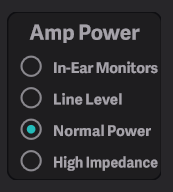
At the right end of the control strip you'll find the Amp Power card with four choices:
- In-Ear Monitors - This setting is best used for in-ear monitors and earbuds
- Line Level - Use this setting for the lowest power output, suitable for connecting to an external amplifier. If you have your own headphone amp or want to record the output of the headphones from BEACN Studio, use this setting when connecting to those devices.
- Normal Power - This setting is what most people will use. It provides enough power for typical headphones.
- High Impedance (~200-300 ohms) - If you have high-impedance headphones like the Beyerdynamic DT series, Sennheiser 600/700/800 series, and others, select this mode. It will increase BEACN Studio's headphone output power appropriate to this type of headphones.
Quick Note
When selecting High Impedance, power output to the device is substantially increased. Using High Impedance with non-high-impedance headphones can damage both your ears and the headphones if you crank up the volume. BE CAREFUL!